


Tuesday, July 13, 2010
Deepika in Housefull
Housefull movie has released it Audio. Deepika is the leading lady with Lara Dutta. Here is Deepika Pics in Housefull movie.





Deepika padukone sony cyber shot
Shot digital camera in India. The company has appointed Bollywood’s top actress Deepika Padukone as the brand ambassador for new Cyber Shot Digital camera. Sony India is planning for investment of more than 50 crore for product marketing campaign in India with Deepika Padukone. Deepika is an youth icon of Indian youngster so the company selected her.Sony Cyber Shot digital camera comes with latest and advanced features. The camera comes with sweep panorama mode that provides users with wide-angle landscape shots. Beautiful actress Deepika Padukone given some hot poses for a photo shoot of Sony Cyber Shot camera ads. She wears shot outfits of light colors and poses with the Cyber Shot camera.


It's all about doing everything online
 In the age of 4G some of the people in India are still using just 1G and 2G technologies, where as it has been a year after releasing the 3G in India. We step back of those technologies only because of lack of security in the cyber-world and flaws. Well one of the upcoming technology is cloud computing. Cloud computing is a technology that uses the internet and central remote servers to maintain data and applications. Cloud computing allows consumers and businesses to use applications without installation and access their personal files at any computer with internet access. This technology allows for much more efficient computing by centralizing storage, memory, processing and bandwidth. All you will need is a web browser to run all the applications on your computer.
Well here I am not gonna write about cloud computing here but it’s a type or example of cloud computing. Which is all about the online resources you can utilize it by your PC or laptop using a web browser. When a word “online” comes out every one thinks that it’s about only sending email and uploading and downloading some content on to the internet. But that doesn’t stops with that, there are lot more applications available on the internet which you can make use of.
AudioTag
Identify unknown pieces of music easily, upload an audio fragment and get the tag info.
Autodesk Homestyler
Online 2D and 3D designing application.
Barcoding
Create an optical machine-readable barcode image by giving barcode data, encoding type and output file format.
CALD
Online Cambridge
Codepad
Online compiler/interpreter.
CutMP3
Upload the Mp3 file and no file size limit either—a cut above the rest!
Digital Dutch Unit Converter
Convert the area, density, energy, force, length, mass, power, pressure, speed, temperature, volume, bits and bytes.
File Converter
Upload a file, choose a conversion type and download the converted file to your computer. Check here for a full list of conversion types.
File Encryptor
Encrypt or decrypt a file online upto a maximum file size of 20MB
FontStruct
Create your own True-Type online.
Google Docs
Create edit and store web-based documents, spreadsheets, and presentations.
http://docs.google.com/
http://docs.google.com/
Google Maps
Find local businesses, view maps and get driving directions in Google Maps
GoToMyPc
Access your PC remotely from anywhere in the world where internet is exist.
Grooveshark
Upload, search and share music, instead of videos, with others.
Ideone
a handy compiler and debugging tool in more than 40 programming languages—choose one of them, paste your source code, share it, or run it and see the results.
InstaCalc
Mixer of an calculator and a spreadsheet application.
Jaycut
An online video editing tool.
KeepVid
Download videos from youtube and other websites.
Klokoo
Online alarm application.
Meebo
Connects you to MSN, Yahoo, AOL/AIM, MySpace, Facebook, Google Talk, and many more!
Net2ftp
Upload files to your web hosting online.
Nitro PDF
Convert from PDF to Word/Excel via PDF-to-Word Converter and PDF-to-Excel Converter.
OCR
Upload an image up to 2 MB in pdf, jpg, gif, tiff or bmp format for optical character recognition and get the real text result right on your screen.
OnlineLinkScan
Scan the URL first for free before getting into it.
PaperRater
Check your document for grammar and spelling errors.
PDFHammer
Modify and remove pages, merge PDFs, set PDF meta-data or protect PDF docs with a powerfull password.
PDFmyURL
PDFmyURL.com is a free tool to easily create a pdf from any webpage or url.
PhotoFunia
Edit your image online and apply lot of effects you like.
Photoshop
This is like a light version of Adobe Photoshop.
Picasa Web Albums
Store and share photos with friends and family, or explore public photos.
Picnik
Picnik is the best online tool lets you edit all your photos online, from one easy place.
PlanningWiz3
Partition rooms and arrange furniture in them easily, with good example plans and allowing you to save, print or export a layout plan to an image file.
RescueTime
This will help you understand how you spend your time on the computer.
SafeWeb
Scan your ULRs before getting into it on Norton safeweb web-based application.
Screen Toaster
Online screen recording application.
Scribd
Upload and view docs of different file formats in fullscreen, make them private and accessible by a specific URL, and share them with your friends.
Skydrive
Online storage service from Microsoft where you can store files photos and documents forever for free. You get 25 GB of storage space and the size limit per file is 50 MB.
Speedtest.net
Test your internet speed online.
Spypig
This is an email tracking service that will send you a notification as soon as someone opens your email.
Stopwatch
An online stopwatch, now count down is on every where you go.
Sumo Paint
Advanced photo editing web-based application, totally free/
TypingWeb
Online typing tutor.
Way2SMS
Send Free SMS to any mobile in India
What Is My IP Address
Locate IP address, proxy detection, email tracing, IP hiding tips, blacklist check, speed test, and forums. Find, get,
WordPress
Create or edit your blog or website.
XE - Universal Currency Converter
Free currency rates, tools, and analysis using the most accurate data.
You Get Signal
Check which ports are open into your network?
YouTube
Watch and upload videos.
Zamzar
Convert images, videos, audio and documents from one format to another.
ZipMyFiles
Zip your files online for free.
Hope you would have enjoyed this article please post comments if any of your site is missing from this list, any your ideas about this article i will be glad to see your comments.
*few above listed sites are free and few required you to be registered before you use.
**few websites listed above are commercial and they provide only trial versions you need to pay to use its full versions.
Wow amazing device from Nokia!!!

Nokia C3 is a social networking phone, which gives the user an easy access to various social networking sites such as Facebook, Twitter and also to some video sharing web sites like Youtube. C3 is Wi-Fi enabled with a 2 MP camera. It also allows access to exclusive instant messengers like Yahoo!, Windows Live and Gtalk. The specifications of Nokia C3 are listed below.

Specifications of Nokia C3
• Quad-band GSM network
• Symbian Series 40 OS
• 2.4-inch display screen
• QWERTY keypad
• Wi-Fi Wireless LAN
• Bluetooth 2.1 with EDR
• 2 mega pixel Camera with LED flash
• Audio Player
• Video Player
• 3.5mm headphone jack
• Ovi mail,Ovi Chat
• Opera mini client
• Quick access to social networking via Communities client
• microUSB
• Expandable memory up to 8GB
• Colours : Golden white, Slate grey ,and Pink
• Access to various instant messengers like Yahoo!, Gtalk, Windows Live etc.
Price in India
The new Nokia C3 will cost just Rs. 7,500/ approximately - in India. Given the features, it’s surely a phone worth buying.
Saturday, July 3, 2010
Official Sharing Buttons on Blogger
 Blogger has been rolling out new features to improve the looks and usability of the blogs. Blogger is now testing out a new Social Sharing icon set consisting of Email, Blogger,Twitter(with goo.gl
shortener),Facebook and Google buzz buttons. The set looks simple and elegant with some cool mouse over effects. These Sharing buttons are now available in your regular dashboard.If you need to take a peek at these new sharing icons, then take a look at my post page(and try sharing it :P ).
You are still reading. So i guess that you are really interested in implementing these Sharing buttons on your Blogger Blog.
Then don’t wait. Just follow these simple steps
- Login to Your Blogger Dashboard
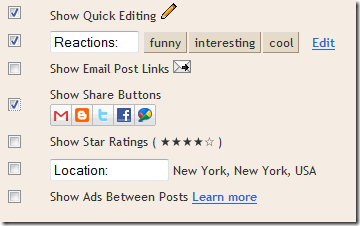
- Go to Design > Page Elements and Click on the Edit Button near the Blog Posts Gadget and check the “Show Share Buttons” Option

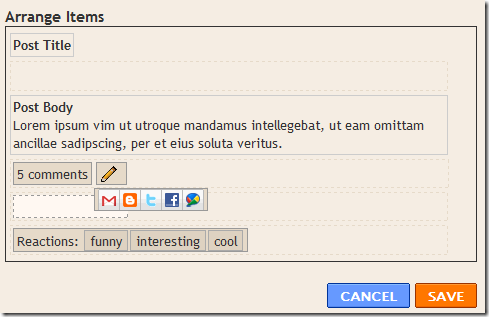
- You can Drag and Drop the Share buttons and place it where you want.
- Now if everything went right, then you should be able to see the Share buttons on your Blog. If not then read on. :)
- If it didn’t appear then don’t worry, That is because you are having a modded template. Just Go to the Edit HTML page under the Design Tab , Check the “Expand Widget Templates” Option and locate
Or if that is not there then find
Or if that is not there then find
and place the following code just below any of these lines[whichever is present in your template].
and Save your template.

Optional Tweaks
- Show the Sharing Buttons on Post pages only - Find the Following Code in your template
and wrap it within conditional tags as
- Hide Some of the Sharing Buttons – If you want you can hide some of these buttons using CSS. For example to hide the Blogger sharing button, add the following code above ]]> in your template
.sb-blog{display:none}sb-email , sb-twitter, sb-facebook, sb-buzz and sb-blog are the different Button Classes. If you hide the mail or buzz buttons, then it might look a little bad as these have rounded edges,
Got into Trouble with implementing the sharing buttons? Ok leave a comment here and i will try to help you out. :)
Thanks to my friend Soufaine for digging this up.
Subscribe to:
Posts (Atom)


